Blog · Chillisign data
Email signature banner analysis: data from 204 companies
How much visibility can an email signature banner bring? According to real data from 204 companies and 3,420 signatures in Chillisign, an active banner is seen on average 255 times a month per employee.
Marketing gets regular contact with its audience right inside the emails the company sends anyway. Below we show when banners are seen, how results differ by team and what role clicks play alongside visibility.
Data
11,476,827
banner events analysed
No survey. Production data from Chillisign, November 2023 – September 2026.
204
Companies
3,420
Email signatures
11.4M
Banner events
34 months
Of tracked traffic
Visibility is the first reason to use this channel
At the measured average, a banner in one active signature is seen about 12 times per working day. A company with 100 active signatures with a banner would get roughly 25,500 impressions a month. That illustrates the scale, it is not a forecast for every company.
For a brand campaign, repeated contact makes sense even when the recipient doesn’t act right away. A product launch, a conference appearance or employer branding can stay visible across everyday communication.
This is where centrally managed signatures pay off. Marketing keeps one visual identity and swaps the banner when the campaign changes. Employees just write emails as usual.
Reach
255
banner impressions a month per employee
About 12 every working day, 3,060 a year. Average per person, March–August 2026.
The audience is in work mode
Impressions follow the rhythm of the working week. Most of them arrive at 10 a.m.
98.4%
Impressions on weekdays
83%
Impressions between 8:00 and 17:00 CET
94.2%
Clicks on weekdays
Full year
94% of clicks come on weekdays

For marketing, that defines the channel’s role. Signature banners show up in the middle of everyday communication with customers, prospects, partners and job candidates. They support an active campaign without the team having to send a separate promotional email.
Classic newsletter
- The recipient has to open it themselves (if it even gets past the spam filter).
- Often ends up unread in a bulk folder.
- Takes a lot of preparation and a separate send.
Email signature banner
- A natural part of the everyday emails people read for work.
- Reaches even people who stopped reading newsletters long ago.
- Runs automatically in the background of everyday communication.
Lifespan
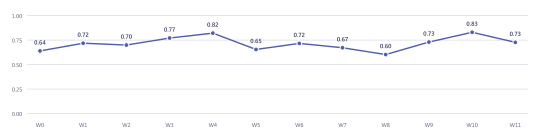
A banner stays fresh for a whole quarter
They work best when the message fits the conversation: an event invitation for a business contact, useful content for a client or a hiring message for a candidate.
How Chillisign helps
You plan campaigns for the whole season ahead and banners switch by date on their own. When it’s time for a new message, you swap the banner in every signature with one click, with no work for IT or employees.
One brand, different messages for different teams
The data shows why one banner for the whole company isn’t always the best choice. Clicks per signature per month differ by the sender’s role: 2.91 in marketing, 2.78 in sales and 1.80 for technical roles. We take the role from the job title in the signature.
Sales clicks 1.5× more than technical roles
Monthly clicks per person by job title in the signature · 3,420 signatures · March–August 2026
Marketing
2.91
Sales
2.78
Back office
2.22
Management
1.91
Technical roles
1.80
Production
1.74
Project management
1.49
Product
1.11
These differences help when planning messages for different audiences. Sales can carry an event invitation, account teams a how-to for customers and HR employer branding. The brand stays consistent, but the message is more relevant.
How Chillisign helps
You assign templates and banners to individual departments. Sales carries the event invitation, HR the hiring message and support a how-to for customers. Signatures sync with Microsoft 365 or Google Workspace, so IT has nothing to set up by hand.
Measure the result that matches the campaign goal
When the goal is awareness, start with impressions and whether the campaign reached the teams and conversations you aimed at. When the goal is a website visit, a sign-up or content discovery, clicks matter more.
Benchmark
2.35
clicks a month per active signature
Average across 204 companies and 3,420 signatures, March–August 2026.
51% of salespeople get no click in a given month
Share of salespeople by clicks per month · 951 person-months
51.4 %
20.1 %
14.2 %
7.4 %
6.9 %
0
1–2
3–5
6–10
11+
An average of 2.35 clicks per signature a month is a useful guide for planning at team level. But in a separate breakdown of 951 salesperson-months, 51.4% recorded no click in that month, while 14.3% had six or more. Individual results vary, so plan for the team, not for one person.
A click is a sign of response, not the whole measure of a brand campaign. And a banner impression doesn’t mean a unique person, nor proof that they remembered the brand. Use the numbers to plan and compare campaigns, and judge each by its actual goal.
How Chillisign helps
You track banner clicks in Chillisign’s analytics and compare results by team and campaign. You see straight away which message works and adjust the next campaign accordingly.
Turn the signature into a campaign plan
01
Pick a message
One that is worth repeating.
02
Choose the teams
The ones whose contacts should see it.
03
A banner per team
One that fits its conversations.
04
Dates and a goal
Impressions for visibility, clicks for response.
05
Review and swap
After the campaign, compare results with the next one.
An ordinary part of every company email becomes a channel marketing can plan, manage and measure. Try Chillisign or see how Benefit Plus used signatures and banners across teams.
You already have the reach. Give it a message.
Your team’s emails reach business contacts every day. With Chillisign you put your current campaign in their signatures and see how people respond.
Explore more
Corporate email signatures with banners - Untapped marketing channel
Email signatures are not just contact details – they are an effective marketing tool. Get a professional look, strengthen your branding, and use advertising banners directly in emails. Add a dash of spice to your communication with Chillisign!
Hidden performance in open threads during peak season
Turn open email threads into micro campaigns. Learn how to design and run seasonal banners for Black Friday, the holidays and January, target teams and measure results with clarity.
How Benefit Plus unified their brand thanks to email signatures
Learn how Benefit Plus used email signature banners and the Chillisign platform to effectively promote their brand.